
Reseller hosting sounds simple on paper: buy bulk server resources, split them into accounts, sell them under your own name. In practice, whether it works out depends entirely on the technical details — what control you actually get over client accounts, how billing gets automated, and whether the numbers hold up once you factor in your own margins. Here's what's actually in Cloudy24's Reseller Linux Hosting plan, and how to think through the business side of it.
What You Actually Get
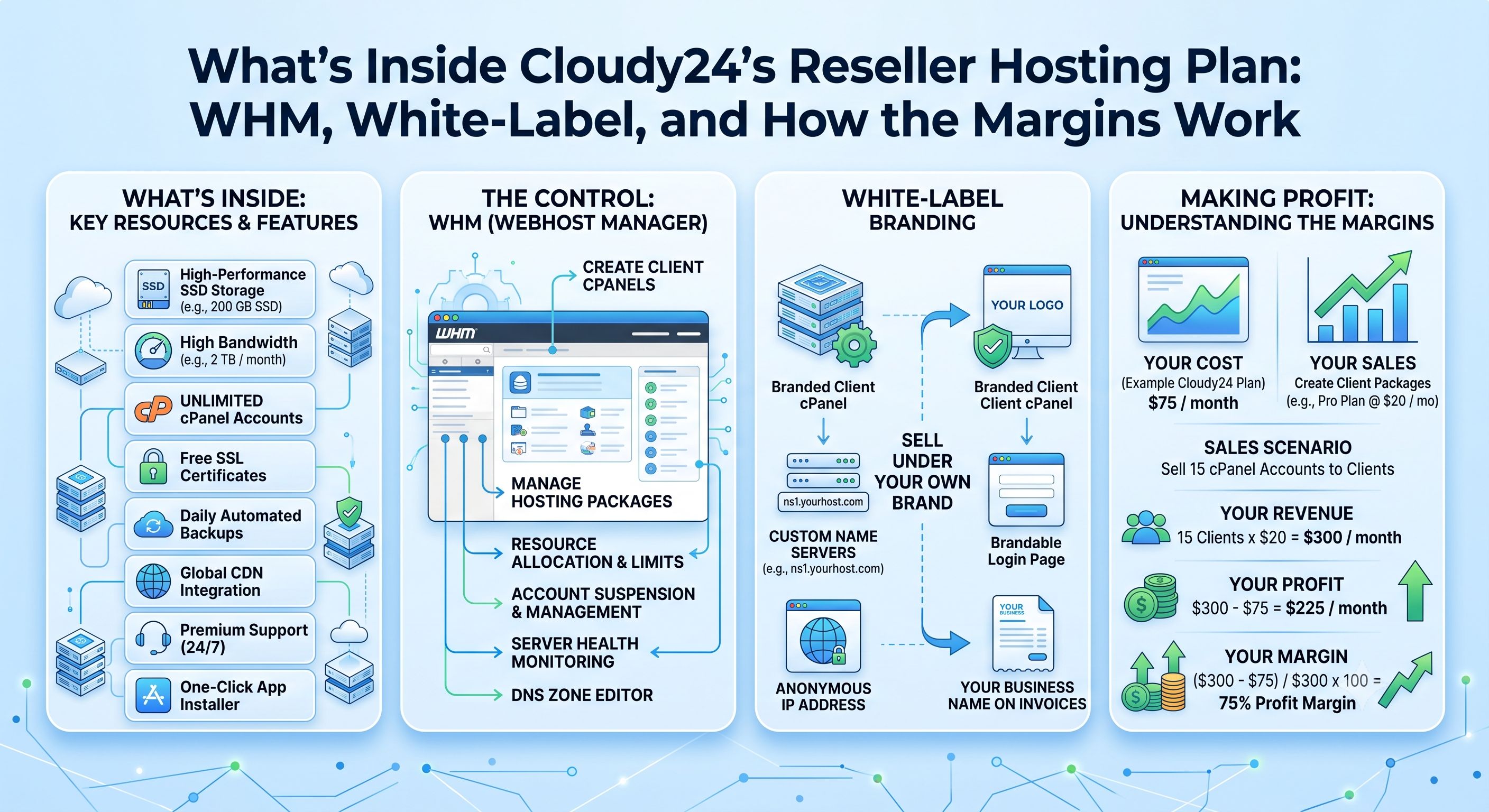
Cloudy24's reseller plan is built around WHM (Web Host Manager) sitting on top of standard cPanel, which is what gives you administrative control over every client account you create:
- WHM + cPanel full access — create, modify, suspend, and terminate client cPanel accounts, and set resource limits at the account level.
- Up to 100 cPanel accounts, each with its own isolated file system, email, and database environment.
- Private nameservers — you can register ns1.yourdomain.com and ns2.yourdomain.com as child nameservers through WHM, so clients point their domains at your infrastructure, not Cloudy24's.
- White-label branding via WHM's Brand Editor, which replaces the cPanel logo, company name, support URL, and documentation links with your own. Cloudy24 isn't referenced anywhere your clients can see.
- WHMCS compatibility — WHMCS connects to WHM through the standard cPanel API, so signups, upgrades, suspensions, and cancellations can run without manual intervention.
- NVMe SSD storage on every account you provision, not just your own.
- Free SSL on all client accounts, provisioned and renewed automatically via AutoSSL/Let's Encrypt.
- Overselling controls, so you can allocate more disk and bandwidth than your raw plan technically holds — the same resource-management approach traditional hosts use.
- Per-client bandwidth and disk quota management, adjustable individually from WHM without touching other accounts.
- 24/7 support — for you as the reseller directly, and as background infrastructure support while you handle the client-facing relationship.
The Technical Stack
If you're evaluating whether this fits your existing workflow or client base, the stack is: cPanel/WHM as the control panel, PHP 8.3 runtime, MySQL 8.0 for databases, WHMCS 8.x for billing, SSL/TLS across accounts, and private DNS for your nameservers. If your clients run standard PHP/MySQL sites (WordPress, WooCommerce, most CMS platforms), this is a drop-in fit — you're not asking them to change anything about how their sites work.
How Pricing and Margins Actually Work
Cloudy24's reseller plans start from ₹2,299/month, with three tiers ranging up to ₹6,499/month, and the pricing is the same at renewal — no first-year discount that jumps later. Free migration is included if you're moving an existing site or account over.
The margin math is straightforward once you separate two things: what you pay Cloudy24 for the bulk resource pool, and what you charge each client for their individual account. Your monthly cost is fixed per tier; your revenue is the sum of what every client on that server pays you. The gap between those two is your margin, and it's wider the more accounts you fill relative to your fixed cost — which is exactly why the per-client quota controls and overselling feature matter. They let you size individual client allocations to match what each one actually needs, rather than giving everyone an equal slice of a plan that may be oversized for most of them and undersized for a few.
Step-by-Step: Choosing a Package Tier to Resell
- Estimate your realistic client count over the next 6-12 months, not just today. Since account limits scale with tier (up to 100 on the top plan), undershooting means an upgrade migration later; overshooting means paying for headroom you won't use for months.
- Profile your typical client, not just the account count. A tier that supports 100 accounts assumes a mix of light sites — if most of your clients run larger WooCommerce stores or high-traffic blogs, resource needs per account matter more than the account ceiling.
- Decide your overselling comfort level. WHM lets you allocate more than your raw limits, but how aggressively you do that is a judgment call based on how predictable your clients' actual usage is.
- Set up white-labeling and private nameservers before your first client signs up. Retrofitting branding after clients are already pointed at generic nameservers is more disruptive than doing it upfront.
- Plan your WHMCS integration early, even if you start with a handful of manual signups. Automated provisioning and billing is what makes the account count sustainable — doing it manually at 20+ clients gets unmanageable fast.
- Leave room to move up a tier. Since pricing holds at renewal, upgrading later doesn't reset your economics — it just adds capacity when you need it.
Support and Migration
If you're already running a shared hosting account and outgrowing it, Cloudy24's support team handles migrating your existing site into the new reseller account and helps you configure WHM and your first client accounts — so switching plans doesn't mean starting your account structure from scratch.
Getting Started
If the numbers work for your client base, the fastest way to see current tier pricing and exact resource allocations is to look at the plan directly: Cloudy24 Reseller Linux Hosting.
 Share on LinkedIn